ES
ES  EN
EN  AR
AR 

Digital signage appears deceptively simple: a screen on a wall displaying dynamic content. Yet, behind that screen lies a sophisticated ecosystem of interconnected components working in concert to deliver timely, engaging, and reliable messaging. Whether you’re a business owner considering your first digital menu board or an IT manager tasked with a large-scale corporate rollout, understanding the fundamental building blocks is crucial for success.
Every professional digital signage solution, regardless of its scale or application, is built upon three core components: Hardware, Software, and Content.
Let’s break down each component to understand its role and importance in creating a powerful communication platform.
1. The Hardware: The Physical Foundation
The hardware is the tangible part of your digital signage network—the equipment you can see and touch. It forms the physical infrastructure that displays your content to the world. The primary hardware elements are the display screen and the media player.
A) The Digital Display Screen
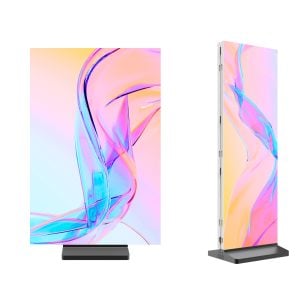
This is the most visible element, and choosing the right one is critical. While it may be tempting to use a standard consumer television, it’s a common and costly mistake. Professional environments demand commercial-grade displays.
- Key Features of Commercial Displays:
- Durability and Longevity: They are engineered to operate for extended periods, often 16 or even 24 hours a day, 7 days a week.
- Higher Brightness: Commercial screens are significantly brighter than consumer TVs, allowing them to remain visible in well-lit retail spaces or areas with glare.
- Robust Construction: They feature stronger components and better heat dissipation to prevent overheating during long hours of use.
- Orientation Flexibility: They are designed to function flawlessly in both landscape (horizontal) and portrait (vertical) orientations without affecting performance or lifespan.
- Comprehensive Warranties: Manufacturers typically offer longer and more comprehensive warranties (often 3 years) that cover commercial use.
Types of Displays:
- Standard Displays: For indoor use in lobbies, retail stores, and restaurants.
- High-Brightness Displays: Essential for storefront windows to compete with direct sunlight.
- Video Walls: Multiple screens arranged together to create one large, seamless canvas for high-impact visuals.
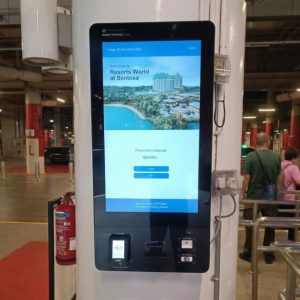
- Interactive Touchscreens: Allow for user engagement, ideal for wayfinding, product Browse, and self-service kiosks.
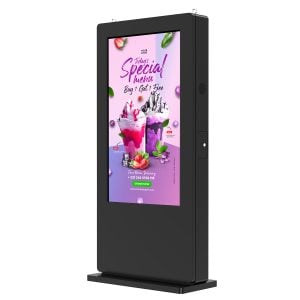
- Outdoor Displays: Weatherproof and ruggedized enclosures protect the electronics from rain, dust, and extreme temperatures.
B) The Media Player
The media player is the engine of the digital sign. It’s a compact computer responsible for storing, processing, and rendering the content that is sent to the display. It receives instructions from the software and ensures that the correct videos, images, and data are played at the right time.
- External Media Players: These are small, standalone boxes that connect to the screen, usually via an HDMI cable. They offer a great deal of flexibility and power, capable of handling demanding content like 4K video, complex multi-zone layouts, and interactive applications. They can also be easily replaced or upgraded without needing to change the entire display.
- System-on-Chip (SoC) Displays: This is a more recent innovation where the media player is integrated directly into the commercial display itself. This creates a streamlined, all-in-one solution that simplifies installation and reduces cable clutter. SoC technology is an excellent choice for straightforward applications like displaying a single video loop or a simple menu board. For more complex needs, an external player often provides more processing power.
2. The Software: The Central Nervous System
If hardware is the body, software is the brain. The Content Management System (CMS) is the software platform that allows you to control your entire network of digital signs. It is arguably the most critical component for day-to-day operations, as it determines how easily and effectively you can manage your messaging.
Typically accessed through a web browser on your computer, a modern CMS empowers you to:
- Upload and Store Content: A central library for all your media assets (videos, images, presentations, web pages).
- Design Layouts: Many CMS platforms include simple design tools that let you create layouts with multiple zones, allowing you to display a video, a news ticker, and the weather forecast all on one screen.
- Create and Schedule Playlists: Arrange your content in a specific sequence and schedule it to play at certain times of the day or on specific dates (a feature known as “dayparting”). This is perfect for running breakfast menus in the morning and dinner specials in the evening.
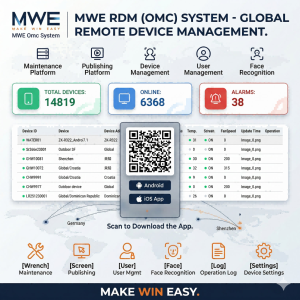
- Manage the Network Remotely: From a single dashboard, you can control screens located in different rooms, different buildings, or even different countries. You can reboot a player, check its status, and deploy new content without ever leaving your desk.
- Assign User Roles and Permissions: In larger organizations, you can give different levels of access to various team members, ensuring brand consistency and security.
Choosing a CMS with an intuitive interface and robust features is paramount to the long-term success of your digital signage strategy.
3. The Content: The Lifeblood
Content is the very reason you invest in digital signage in the first place. It is what your audience actually sees and engages with. The most advanced hardware and the most intuitive software are useless without compelling, relevant, and fresh content.
Effective content should be:
- Visually Appealing: Use high-resolution images, professional videos, and clean, easy-to-read fonts. Poor quality content will reflect badly on your brand.
- Relevant to the Audience: Tailor your message to the people who will be seeing it. Employees need different information than customers.
- Concise and Scannable: People typically glance at digital signs for only a few seconds. Messages should be short, direct, and easy to digest. Use visuals to tell the story whenever possible.
- Dynamic and Fresh: The key advantage of digital over static print is the ability to change content easily. Keep your playlists updated with new promotions, announcements, and information to prevent “screen fatigue.”
- Aligned with Your Goals: Every piece of content should have a purpose, whether it’s to inform, entertain, persuade, or direct.
In summary, a successful digital signage solution is a three-legged stool. The hardware provides the physical presence, the software provides the control and intelligence, and the contenido provides the message and value. When making an investment, it’s crucial to evaluate all three components to ensure they form a cohesive, reliable, and powerful system that meets your communication objectives.